
Download the PDF
- In the flyer builder, select Download PDF flyer. It saves your choices first.
- Open the PDF to check it.
The flyer uses your team logo from Settings, then General. Upload it as a PNG so it shows on the PDF.
Share the link
Under Public flyer link you'll find the PUBLIC LINK:
- Select Copy and paste the link into a text, email or post.
- Select Open to see what others will see.
"Anyone with the link can view the flyer." No account is needed.
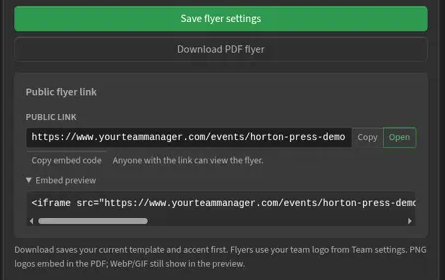
Copy embed code copies code that shows the flyer on your team website. Send it to whoever runs your site.
- Open the PDF, or open the public flyer page.
- Print with the printer icon, or Ctrl+P (Windows) or Command+P (Mac).
The flyer fits regular letter paper.