
The Wrestling Journal is your place to set goals, plan your week, and write what you learned at practice. This takes a few minutes on iPhone.
Before you start
- Use an email you can open right now. You'll need a code in the next step.
- If your coach gave you a team invite code, keep it handy. You can enter it now or join a team later.
Create the account
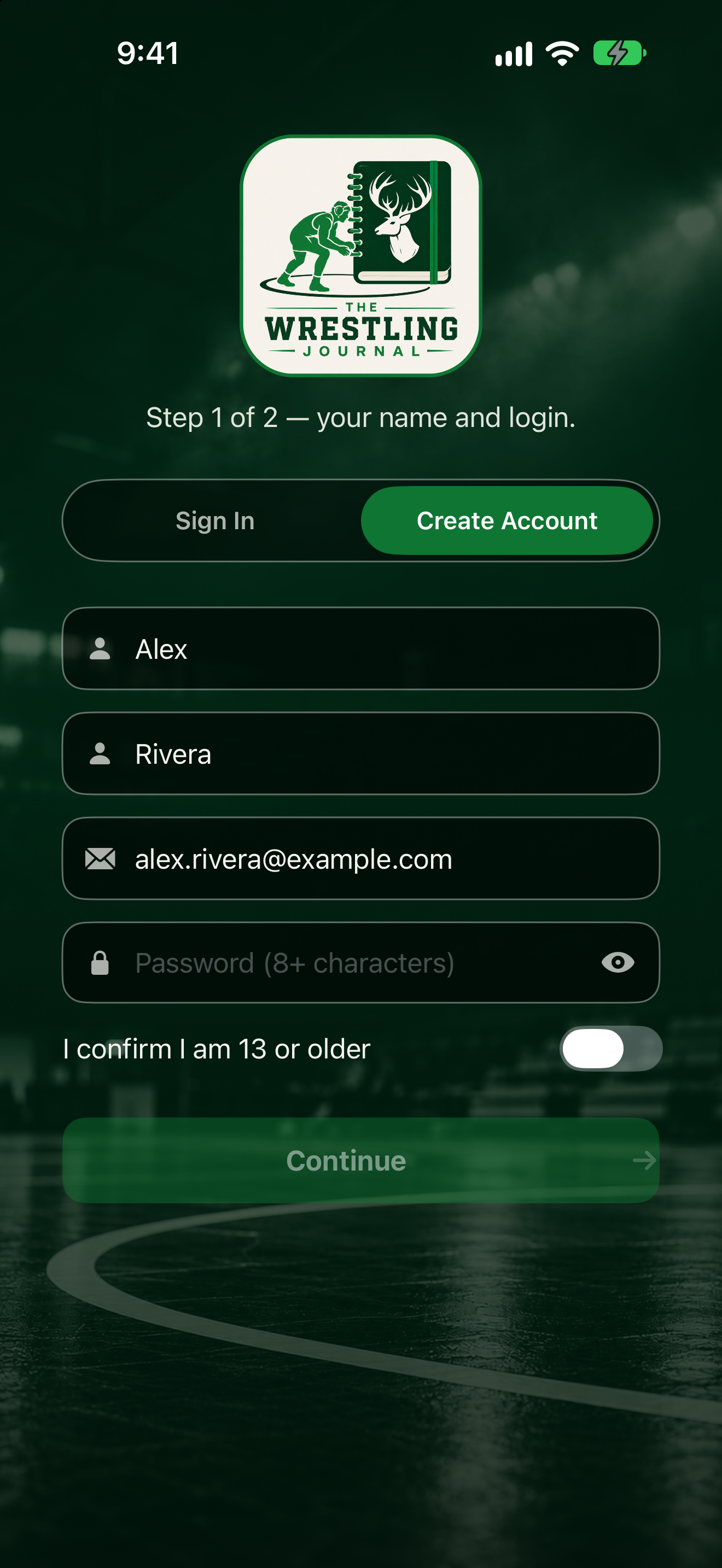
- Download The Wrestling Journal from the App Store and open it.
- Tap the Create Account tab (next to Sign In).
- On the screen for step 1 of 2 (your name and login), fill in First name, Last name, Email, and Password (8+ characters). Turn on I confirm I am 13 or older, then tap Continue.
- On step 2 of 2 (your state, and a team invite code if you have one), pick your State. If you have a code, type it under Invite code and tap Check. This is optional.
- Tap Create Account.
You'll see Verify email. Go to the next step to enter your code.
If something goes wrong
- Already have an account? Tap the Sign In tab instead.
- Need to change your name or email before finishing? Tap Back on step 2 to return to step 1.
- Having trouble signing in later? See Sign in and reset your password.