
Team Notes
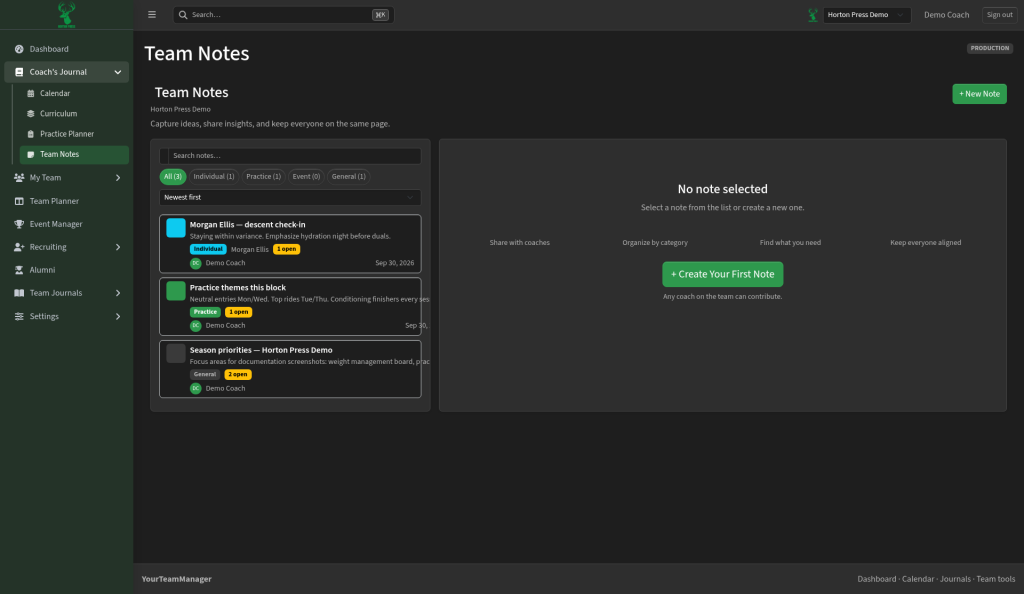
Team Notes is a shared notebook for coaches. Capture thoughts about athletes, practices, events, or the season — and turn follow-ups into tasks.
How to open it
In the side menu, open Coach's Journal, then select Team Notes.
Note categories
Filter the list by:
- All
- Individual — about one athlete
- Practice — themes or reminders from the room
- Event — duals, tournaments, and travel notes
- General — season priorities and other team-wide notes
Sort with Newest first (or change the sort) and search by keyword.
Create a note
- Select + New Note.
- Choose a category and write the note.
- Add action items when something needs follow-up.
- Save.
Open action items show as a badge (for example “1 open”) on the note card so nothing gets lost.
Action items become planner tasks
When a note has open action items, those can feed the Team Planner so coaches can triage and finish the work on the board. Keep the note for context; use the planner to track who owns the follow-up.