
Recruiting is available on the Super program license.
In the side menu, open Recruiting, then Dashboard.
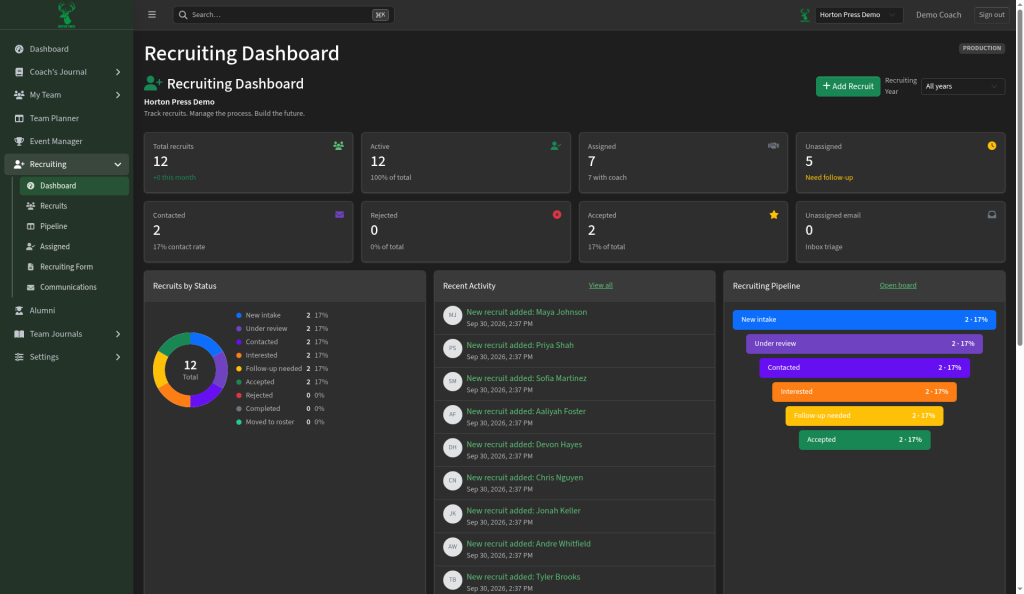
The summary cards
- Total recruits and Active
- Assigned: recruits with a coach responsible.
- Unassigned: no coach yet ("Need follow-up").
- In Contact: recruits marked Contacted, Interested or Follow-up needed.
- Rejected and Accepted
- Unassigned email: recruiting emails still to sort ("Inbox triage").
Other parts
- Recruiting Pipeline shows how many recruits are in each stage. Select Open board for the full board.
- Select Add Recruit to add one, or filter by Recruiting Year.
If Recruiting isn't on for your team, the page says "Recruiting is a paid add-on" with a Request Access button.