
In the side menu, open Coach's Journal, then select Calendar.
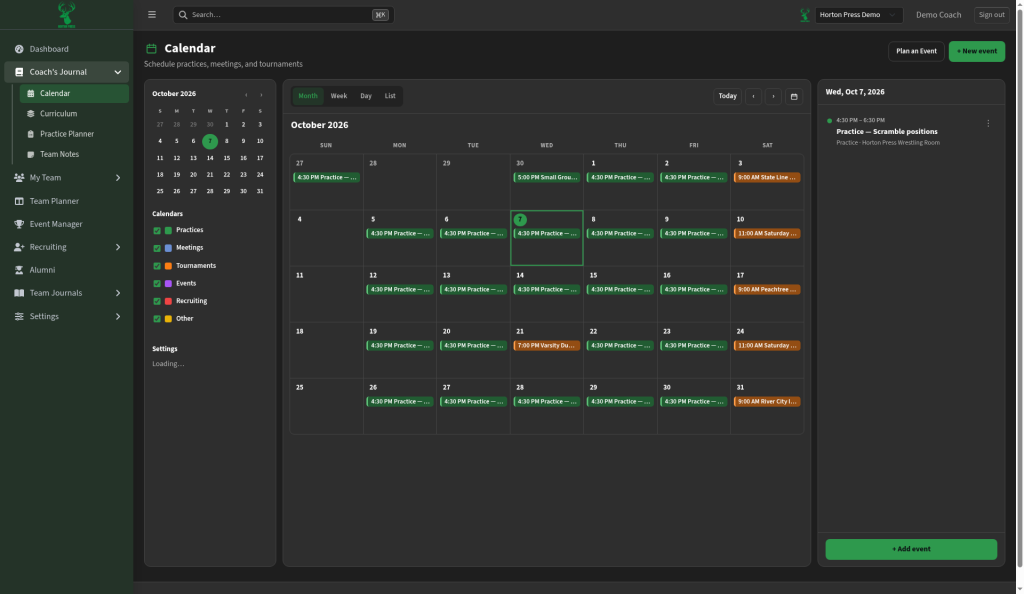
Change the view
- Pick a view: Month, Week, Day or List.
- Use Today or the arrows to move through dates.
Show or hide event types
- On the left, under Calendars, find the list of types: Practices, Meetings, Tournaments, Events, Recruiting and Other.
- Check or uncheck a box to show or hide that type. Colors help you tell them apart.
Set your defaults
The calendar settings are in the left sidebar, under the types:
- Default view: the view that opens when you come to the Calendar.
- Week starts on: the first day of each week.
- Email reminders to coaches: check this to email coaches before events.
- Remind before: how long before an event the reminder goes out. You can change it only after email reminders are on.