
Use this for everyday events. If you're hosting a tournament, see Quick calendar event or hosted event?.
Add an event
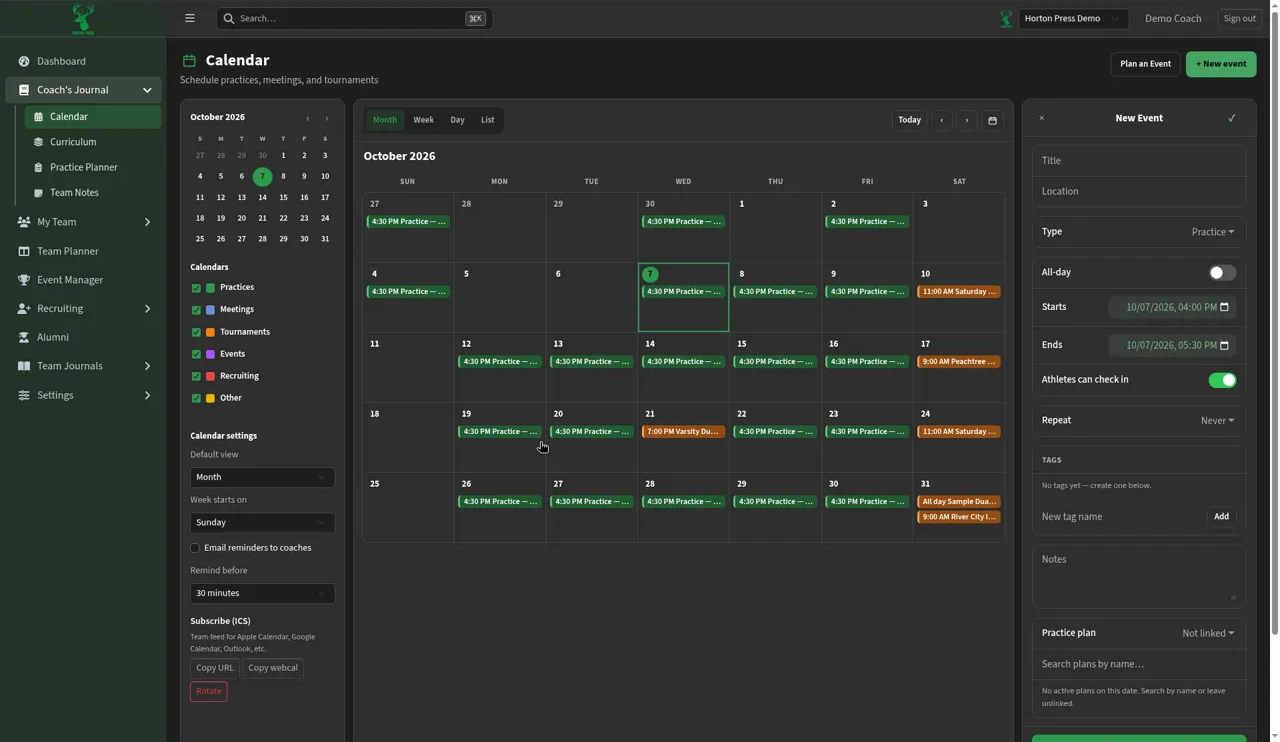
- On the Calendar, select + New event. Or select a day and use + Add event at the bottom of the day panel.
- In the New Event panel, type a Title and Location.
- Pick a Type: Practice, Small Group, Dual, Tournament, Competition, Event, Team meeting, Recruiting or Other.
- Turn on All-day, or set Starts and Ends.
- Leave Athletes can check in on if you'll take attendance at it.
- To repeat it, pick Repeat: Never, Every Day, Every Week, Every 2 Weeks, Every Month, Every Year or Custom.
- Add Tags and Notes if you like.
- For a practice, search Practice plan to link a plan, or leave it unlinked.
- Select Save, or Save and Create a Practice Plan to write the plan next.
Good to know
Only events with Athletes can check in turned on show up in Check-in and attendance reports.