
The Dashboard is your coaching home. Select Dashboard at the top of the side menu to open it.
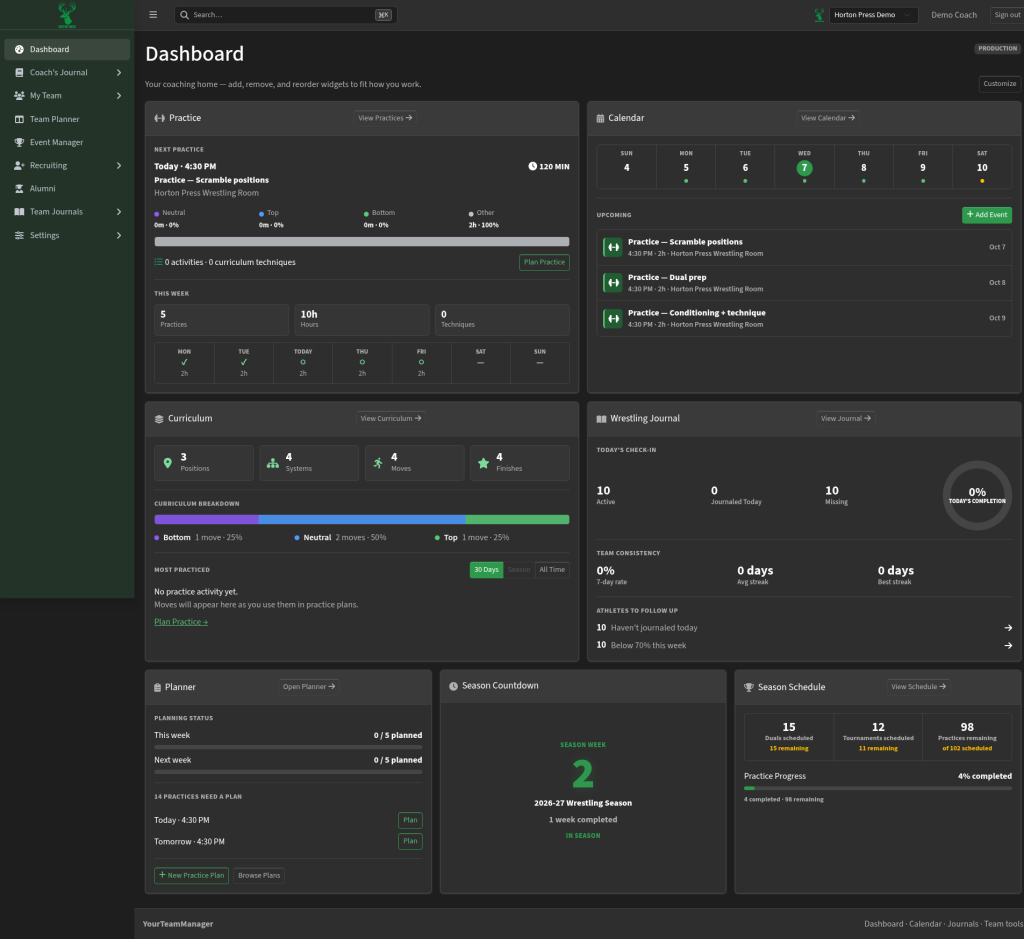
The cards
- Practice: NEXT PRACTICE shows the day, time, place and length of your next practice. THIS WEEK adds up Practices, Hours and Techniques. Select Plan Practice to write or open its plan.
- Calendar: UPCOMING lists your next few events. Select + Add Event to add one without leaving the Dashboard.
- Season Countdown: which week of the season you're in.
- Season Schedule: how many duals, tournaments and practices are left.
- Curriculum: counts of Positions, Systems, Moves and Finishes, plus CURRICULUM BREAKDOWN and MOST PRACTICED. Switch MOST PRACTICED between 30 Days, Season and All Time.
- Planner: PLANNING STATUS shows how many upcoming practices still need a plan, for example "2 PRACTICES NEED A PLAN."
- Team Notes: your team's most recent notes, with who wrote each one and when. Select a note to open it.
- Team Journals: who journaled today, team streaks and athletes to follow up. See See who journaled today.
About the Moves count
The Moves box shows two numbers:
- unique: how many different moves you have.
- in pathways: every time a move appears in a pathway. A move used in two pathways counts twice, so this number can be bigger.