
Reporting
Reporting pulls totals from check-ins, weigh-ins, and descent plans so you can review the season without digging through every page.
How to open it
In the side menu, open My Team, then select Reporting.
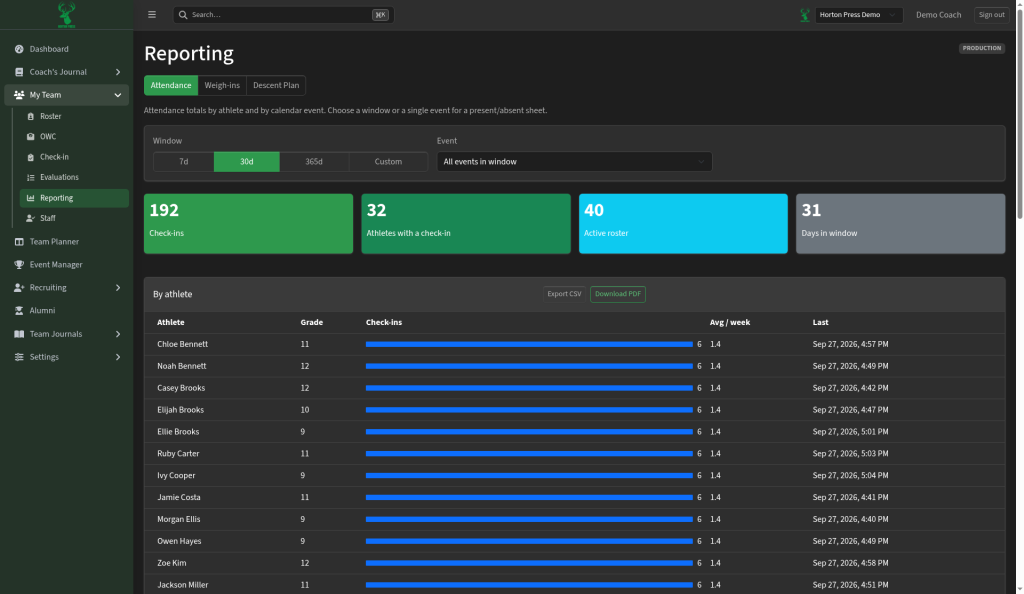
Tabs
- Attendance — totals by athlete and by calendar event
- Weigh-ins — weight history and related summaries
- Descent Plan — descent tracking across the roster
Attendance report
- Choose a time Window (7 days, 30 days, 365 days, or Custom).
- Optionally narrow to one Event, or keep all events in the window.
- Read the summary cards (check-ins, athletes with a check-in, active roster size, days in the window).
- Scroll the By athlete table for check-in counts, average per week, and last check-in time.
Export
On the report table, use:
- Export spreadsheet (CSV) — open the data in a spreadsheet
- Download a printable PDF — share a printable sheet
Use the same idea on Weigh-ins and Descent Plan when you need a file for staff or administration.