
Calendar
The Calendar is where you schedule practices, meetings, tournaments, and other team events.
How to open it
In the side menu, open Coach's Journal, then select Calendar.
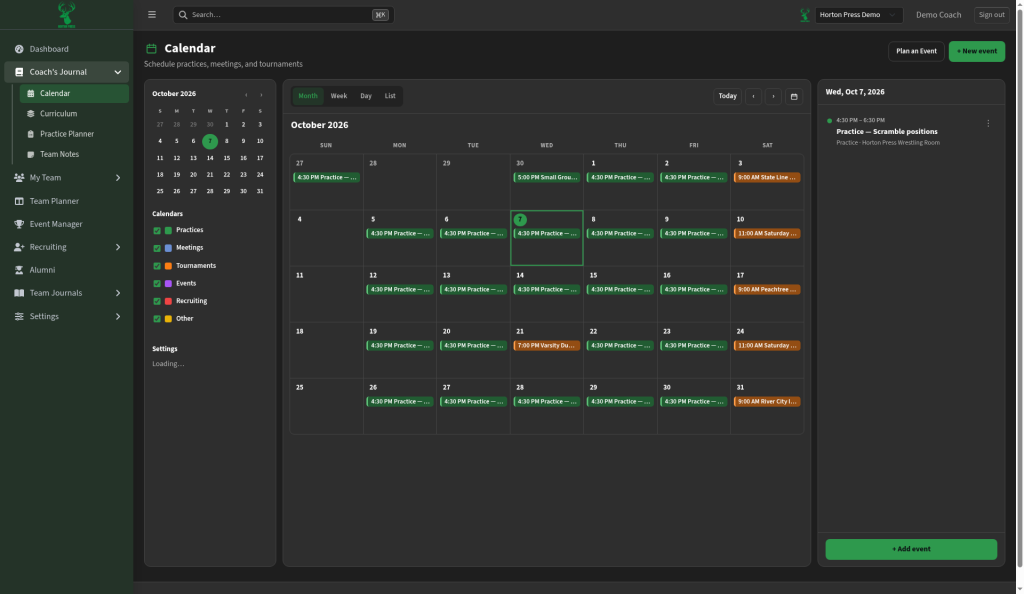
Views
Switch between:
- Month — see the whole month at a glance
- Week — focus on one week
- Day — detail for a single day
- List — events in a simple list
Use Today or the arrows to move through dates.
Calendar types
On the left, turn calendar types on or off with the checkboxes:
- Practices
- Meetings
- Tournaments
- Events
- Recruiting
- Other
Colors help you tell types apart on the grid.
Add an event
- Select + New event (or + Add event on a day panel).
- Fill in the title, time, type, and location.
- Save.
You can also select a day on the right panel to review what is already planned, then add another event from there.
Plan an event
Plan an Event is a separate path when you are building a larger hosted tournament plan. Day-to-day practices and duals usually start with + New event.